 serin labs
A room sensor supplies the measurement; the indoor unit controls heating and cooling toward your target temperature.
On this page
Target and measured temperature
A wall-mounted unit measures return air near the ceiling, which can differ from the temperature near a chair or bed. A remote sensor lets the unit use the temperature where you sit.
A sensor visible in an app does not automatically control the unit. Select it as the controller's temperature source.
Where the reading comes from
- Indoor unit
- The built-in return-air sensor needs no network connection.
- Direct Bluetooth
- A compatible thermometer sends readings to the controller within Bluetooth range. ESPHome needs a matching sensor configuration.
- Home Assistant entity · ESPHome
- Needs Home Assistant, its sensor integration and the network connection to the controller. A Bluetooth proxy still sends readings through Home Assistant.
- Serin Link
- Sends readings directly by wireless radio. Pair it, then select it as the source.
When a source becomes unavailable
On HomeKit-compatible and Matter-compatible firmware, Single uses one source. Average uses fresh readings from selected remote sources; if one stops reporting, the others still contribute.
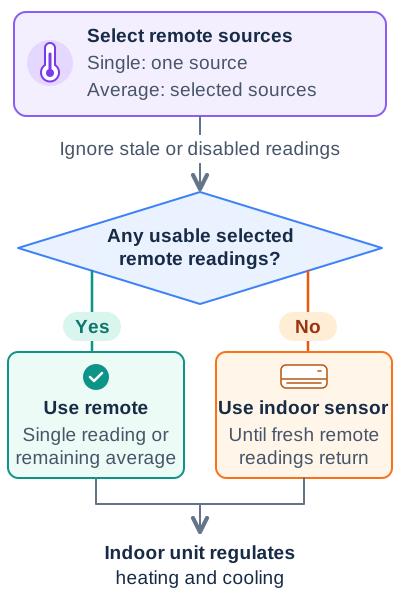
On ESPHome, the indoor unit uses its built-in sensor when remote readings time out, then resumes remote readings when they return. In custom YAML, remote_temperature_timeout controls that interval.
Before calibrating, check the source's connection and temperature unit. Calibration corrects an offset, not a missing reading.
For setup, see Choose a room sensor.