 serin labs
The Serin Controller sends commands and reads state through the CN105 port inside one Mitsubishi indoor unit. The unit still controls its own heating and cooling.
On this page
Understand the connections
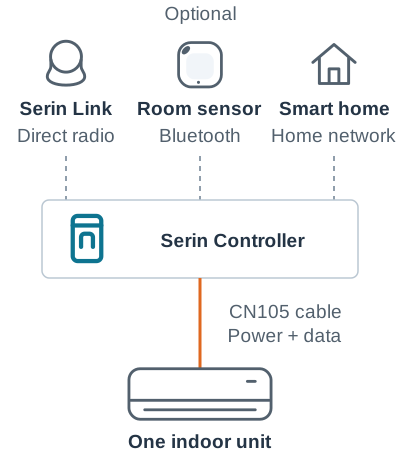
Install your chosen firmware before fitting the controller. Serin Link and a smart-home app are optional; you can use either or both.
Choose how you want to control the unit
- ESPHome: connect to Home Assistant.
- HomeKit-compatible firmware: connect to Apple Home. This optional, open-source firmware is free to install.
- Matter-compatible firmware: connect to Google Home, Alexa, SmartThings, Apple Home or Home Assistant.
Start with Choose your firmware if the board is unflashed.
To use Serin Link without a smart-home app, follow Serin Link setup. For browser controls, open the local web interface once the controller has joined Wi-Fi.
What works locally
The web interface works on your local network. A paired Serin Link can control the unit without a router or internet connection. Neither requires a Serin Labs account or subscription.
Your smart-home platform has its own hub and internet requirements for remote access, voice control and automations. Sensor dependencies are covered in how temperature control works.
More than one indoor unit
Use one controller and cable per indoor unit, with distinct room names. The indoor units' shared outdoor-system limits still apply.