 serin labs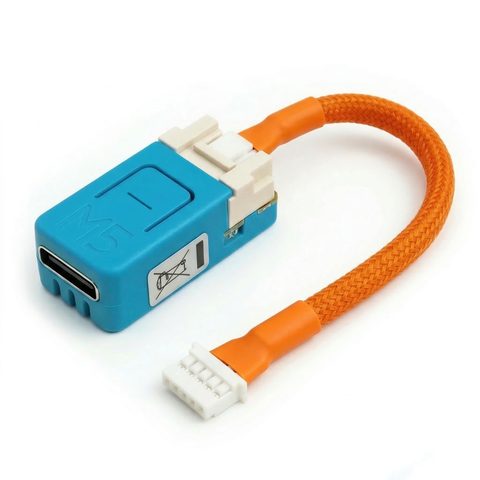
The pre-assembled option
The Serin Controller ships pre-assembled with the CN105 cable included, ready to flash the firmware of your choice: ESPHome, Apple Home, or Google Home & Alexa compatible. The rest of this page covers building your own.
On this page
1. CN105-to-Grove cable (required)
This cable connects the ESP32 board to the CN105 service port on a Mitsubishi indoor unit. It uses a JST PAP-05V-S housing at the indoor unit and a Grove HY2.0-4P connector at the ESP32 board. Use the pinout and part numbers in the wiring reference to make your own, or purchase a ready-made cable from $8. Choose the 50 cm cable for a ducted air handler; see the length guide for details.
2. ESP32 board (required)
Choose one of the two supported boards. Both work with the ESPHome, Apple Home, and Google Home & Alexa compatible firmware.
M5Stack NanoC6
RecommendedThe smallest supported option, with Wi-Fi 6.
ESP32-C6 · 23.5 × 12 mm
M5Stack StoreM5Stack Atom S3 Lite
A larger board with a faster dual-core processor.
ESP32-S3 · 24 × 24 mm
M5Stack StoreDetailed spec comparison
Scroll sideways to read all columns.
| NanoC6 | Atom S3 Lite | |
|---|---|---|
| Chip | ESP32-C6 (RISC-V, 160 MHz) | ESP32-S3 (dual-core, 240 MHz) |
| Wi-Fi | Wi-Fi 6 (802.11ax, 2.4 GHz) | Wi-Fi 4 (802.11n, 2.4 GHz) |
| Size | 23.5 × 12 × 12.5 mm | 24 × 24 × 13 mm |
| USB | USB-C | USB-C |
| Grove port | HY2.0-4P | HY2.0-4P |
| Button | Yes | Yes |
| ESPHome | Full support | Full support |
| HomeKit | Full support | Full support |
| Google Home & Alexa | Supported (beta) | Supported (beta) |
The NanoC6 is recommended for most setups: it is smaller and holds a stronger signal inside the sheet metal of HVAC units.
3. USB-C data cable (for firmware installation)
This cable is required for the initial firmware installation. A USB-C cable that supports phone data transfer usually works.
- Must be a data cable, not a charge-only cable.
- Test it by connecting a phone; if your computer detects it, the cable works.
Shopping list
| Item | Where to buy |
|---|---|
| CN105-to-Grove Cable | Buy ready-made or DigiKey (DIY parts) |
| ESP32 Board (NanoC6 or Atom S3 Lite) | M5Stack Store |
| USB-C Data Cable | Likely already on hand |
Multiple indoor units
You need one board and one cable per indoor unit because each indoor unit has its own CN105 port. A three-zone system requires three boards and three cables.
Optional accessories
- USB-C data cable: required only for the initial firmware installation; later updates are installed over Wi-Fi.
- Label maker or tape: helpful for labeling cables in multi-unit installations.
- USB-C power supply: for powering the board on a bench to test it before installation.
Next steps
- Check your model: type your model number for an instant compatibility answer.
- Flash the firmware: install ESPHome, Apple Home, or Google Home & Alexa compatible firmware from your browser.
- Connect the cable: attach it to the indoor unit.
Links are provided for convenience and are not affiliate links.