 serin labs
On this page
Check the selected zone, connection state, firmware versions, and reported sensor readings before contacting support. For a warning message, use Troubleshooting.
About and Details
- Open Settings.
- Highlight About.
- Tap Details, or push the knob.
- Move your finger up within the list to see more information.
When the controller reports a battery level for a remote sensor, Sensor battery · N% shows in the center of Settings with About highlighted.
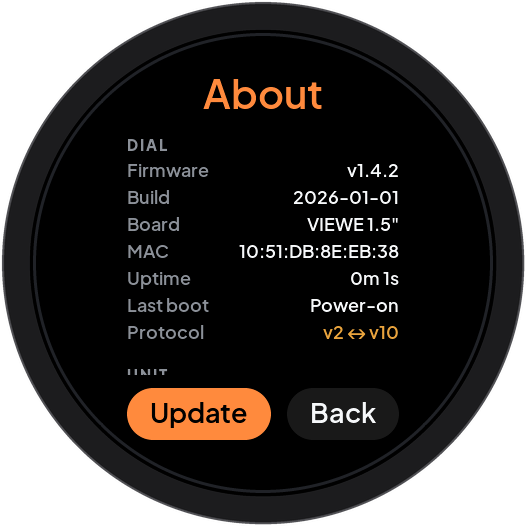
Turn the knob to scroll. At the end of the list, select Update or Back and push the knob.
Scroll sideways to read all columns.
| Section | Information |
|---|---|
| DIAL | Serin Link firmware, build, board, MAC address, uptime, last restart reason, and wireless protocol versions. |
| UNIT | Serin Controller identity and available firmware, restart, and Wi-Fi details. |
| LINK | The wireless connection between Link and the controller, signal strength, and time since the last message. |
| HEAT PUMP | CN105 connection, available operating details, and reported heat pump faults. |
| SENSOR | Available remote sensor temperature, humidity, battery level, and signal strength. |
| LINK SENSOR | Available temperature and humidity measured by Link’s sensor. |
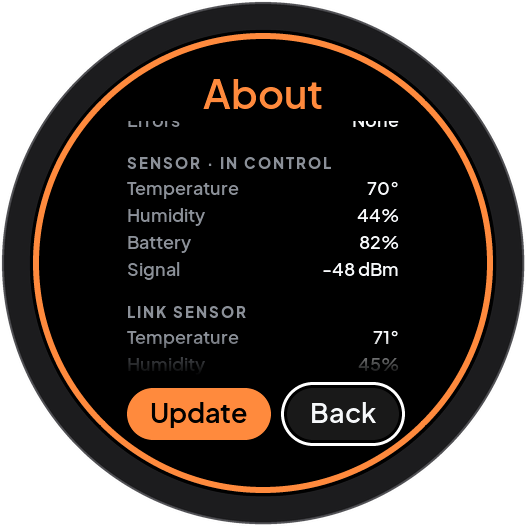
IN CONTROL marks a sensor source that the controller reports as selected with a valid reading. Other measurements can remain visible without controlling the heat pump. Unsupported sections or fields are absent. A dash means that a value is unavailable or no report arrived yet.
Contact support
For support, record the selected zone, Link board, both firmware versions, connection status, and any fault code. Include the Last boot, Last seen, and signal fields when available. Describe the action and message that preceded the problem. Send these details through Serin support.
Heat Pump status
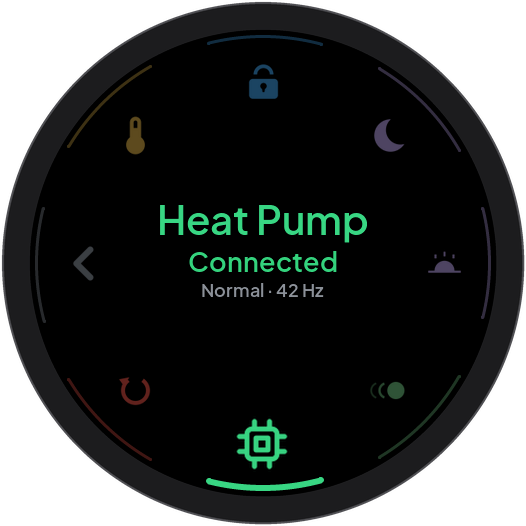
Heat Pump is a status display. It does not adjust the heat pump. Connected means that the controller reports CN105 communication. Not connected means that it reports no CN105 communication.
Fault with a code is a heat pump fault. A count such as 3 errors reports communication errors. Available operating details can include the operating stage, compressor frequency in Hz, and outdoor temperature. Missing details depend on what the controller and heat pump report.
With multiple zones, push the knob when choose appears to open zone selection. Select the required zone. In this firmware revision, zone selection returns home. Reopen Advanced to inspect that zone’s Heat Pump status.
About this manual
Your firmware version can be different from the version that this manual describes.