 serin labs
Can a Nest or ecobee Run a Mitsubishi Mini-Split? Yes — Here's What It Costs You
In my thermostat roundup I opened with the wall: you buy a Nest, open the box, and there's nowhere to wire it. That's still true at the wall. It's not the whole story at the unit.
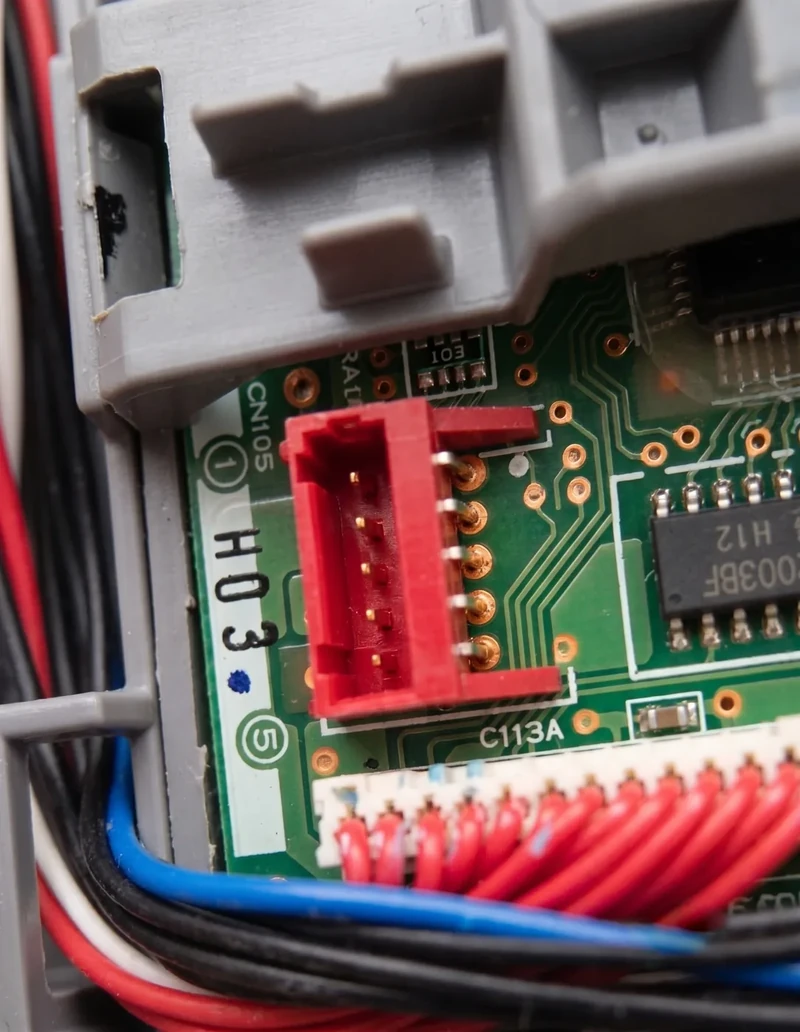
Mitsubishi sells the missing wires. It's called the Thermostat Interface, it plugs into the same CN105 port this entire site is about, and it presents R, C, G, W1, and Y1 to a conventional thermostat. So the answer to the headline is a straight yes. Your Nest or ecobee can run a Mitsubishi mini-split.
The interesting part is the bill. And after reading the manual cover to cover, the thing most people assume you lose isn't actually the thing you lose.
Quick Facts: The Mitsubishi Thermostat Interface
- What it is: a Mitsubishi-made module that converts a 24V thermostat's dry contacts into commands on the indoor unit's CN105 serial port.
- Part numbers: PAC-US444CN-1 (original), PAC-US445CN-1 (Thermostat Interface 2), and PAC-US446CN-1, which retailers listed as the current part in August 2026.
- Terminals: TC, C, TR, R, G3, G2, G1, Y2, Y1, W2, W1, G. A single-stage install uses R, C, G, W1, Y1.
- Thermostats tested by Mitsubishi: ecobee, Honeywell, Nest, Lyric, and INNCOM with fan speed control.
- Modulation: the unit still varies capacity on a stage-1 call. The PAC-US445CN-1 submittal states "W1/Y1: Capacity is adjusted automatically based on room (default)" and "W2/Y2: Full capacity."
- Requires: a field-supplied 24VAC circuit and thermostat wiring. One interface per indoor unit.
- Street price: $229.99 at RFWEL and $283.50 at Acme Controls as of August 2026, before the thermostat, transformer, or labor.
- Hard limit: with the interface fitted, Mitsubishi's own MA/ME wall controllers are "not supported as they will interfere with the correct operation."
How Does the Interface Get a Nest onto a Mini-Split?
It sits between two things that don't speak the same language and translates in one direction. On one side are ordinary thermostat terminals. On the other is a pigtail that, per the PAC-US445CN-1 installation manual (MEUS DOC# MD-1622-K001 Ver. 2, April 2022), you "connect… to the connector CN105 on the indoor unit control board."
That's the same five-pin port the Kumo Cloud adapter uses, the same one the MHK2 wires into, and the same one a local CN105 controller clips onto. One port, one occupant. If the interface is on CN105, nothing else is.
Here's the full terminal list, straight out of section 3 of that manual (MD-1622-K001):
| Terminal | Purpose |
|---|---|
| TC | C: common (in) |
| C | C: common (out) |
| TR | R: 24 VAC (in) |
| R | R: 24 VAC (out) |
| G3 | High fan speed |
| G2 | Medium fan speed |
| G1 | Low fan speed |
| Y2 | Stage 2 cooling |
| Y1 | Stage 1 cooling |
| W2 | Stage 2 heating |
| W1 | Stage 1 heating |
| G | Fan |
Note what TR and TC are doing there. The interface doesn't generate 24V — you feed it. The manual lists a 24VAC circuit as a field-supplied requirement and offers a transformer as an accessory. A mini-split has no furnace transformer to borrow from, so that's a real part and a real install step.
The manual also carries a warning that surprises people: "Thermostat should be configured for use with a conventional system (not heat pump)." You set your Nest up as if it's driving a gas furnace and an AC condenser.
Does It Kill Inverter Modulation?
This is where I expected to write the bad news, and the manual didn't cooperate.
The common claim — I've seen it on forums, and I half-believed it going in — is that a 24V thermostat reduces an inverter heat pump to a dumb on/off box. That's not what Mitsubishi documents. On the PAC-US445CN-1, DIP switch SW2-6 "adjusts indoor unit operation during stage 1 heating (W1) and stage 1 cooling (Y1)," and the default position is OFF:
OFF — The capacity is adjusted so that the room temperature is adjusted (heated or cooled) at a fixed rate (default). ON — Full capacity
The PAC-US445CN-1 submittal (© 2023 Mitsubishi Electric Trane HVAC US LLC) says the same thing in plainer words: "W1/Y1: Capacity is adjusted automatically based on room (default)" and "W2/Y2: Full capacity."
So on a stage-1 call, the compressor still modulates. What the second stage does is give up on modulating and go flat out. That's the opposite of the folklore, and it's worth saying clearly: the interface does not turn your inverter into a single-speed unit.
There's a second nuance in the manual that I liked. Temperature sensing is a hybrid: "The PAC-US445CN-1 relies upon both the 24 VAC thermostat and the indoor unit's thermistors in order to monitor room temperature. The thermostat's temperature sensing is used to set the room temperature. The indoor unit thermistor is used when calculating cooling and heating rates of change."
Your Nest becomes the room sensor. That's a genuine upgrade over the unit's own thermistor up at the ceiling — the same argument I make for the MHK2 and remote sensors.
So What Do You Actually Give Up?
Not modulation. Something subtler, and in some ways worse: resolution and visibility.
A thermostat wire carries a closed contact or an open one. Nothing else. Your Nest knows you asked for 71°F, but that number never reaches the heat pump — it reaches the interface as "W1 is energized." The manual confirms the division of labor bluntly, listing Mode 2, the indoor unit's room-temperature detection location, as "Unused (room temperature detected by the connected thermostat)."
The concrete losses, all from the manual:
- No Mitsubishi wall controller, ever. "During normal operation, the connection of Mitsubishi Electric remote controllers (e.g. MA/ME) is not supported as they will interfere with the correct operation of the PAC-US445CN-1." It's the interface or an MHK2. Not both.
- No vane or swing control. The terminal list has fan speed and stage calls. Louvers aren't on it.
- No diagnostics coming back. Compressor frequency, outside air temperature, error codes — a dry contact can't carry any of it. The wire only goes one way.
- A two-hour hold by default. SW1-1 in its default OFF position means the system will "stay in heating or cooling mode for 2 hours once W1 or Y1 is no longer active," which "does not respond to fan request changes (G) during the 2 hours."
- Setpoint clamping. "The indoor unit will limit the internal temperature control set point based on the indoor unit specification."
- Modes are coarse. Cool, Heat, Fan, Off, plus Auto. That's the menu.
- One per head. "The connection of more than one PAC-US445CN-1 to a single set of thermostat dry-contacts is not supported." A three-zone system needs three interfaces and three thermostats.
- Some Nests need surgery. The submittal footnotes that "Non-learning Nest thermostats require installation of 2.2k mW resistors between terminals TC-Y1 and C-W1." The unit label there is garbled in Mitsubishi's own sheet, so confirm the resistor spec with your distributor rather than guessing.
And one that isn't technical: "Only a dealer or qualified technician should install, relocate, reinstall or repair the device." Budget for a contractor.
PAC-US444CN-1, PAC-US445CN-1, or PAC-US446CN-1: Which Is Current?
Three part numbers are in circulation and the search results are a mess, so here's what I could verify on 2026-08-06.
The PAC-US444CN-1 is the original. Its Canadian spec sheet (Form # SB_PAC-US444CN-1_201801) lists tested thermostats as Nest, Honeywell, Lyric, and INNCOM — no ecobee. It also carries a long compatibility chart of OK and NO rows by model and revision, which is worth pulling if you have an older unit.
The PAC-US445CN-1, branded Thermostat Interface 2, added ecobee to the tested list and added support for the PAA intelli-HEAT indoor unit, which the 444 doesn't work with. This is the one I could retrieve full Mitsubishi documentation for, and every specification quoted above comes from it.
The PAC-US446CN-1 is the wrinkle. RFWEL lists the 445 as "DISCONTINUED/END-OF-LIFE (EOL)" replaced by the 446, and Parts Town flags the 445 as "Obsolete, replaced by MITPAC-US446CN-1." RFWEL and Acme Controls both listed the 446 in stock when I checked. I could not retrieve a Mitsubishi-hosted submittal or manual for it, so I'm not quoting 446 specifications — reseller material describes the same CN105 connection and the same W1/Y1 automatic capacity behavior, but that's their wording, not Mitsubishi's.
Practical advice: order by asking your distributor which interface is current for your indoor unit, and get the compatibility chart for your specific model and revision before you buy anything.
What Does It Cost, All In?
You already own the thermostat — that's the premise of this post, and it's the interface's best argument. Everything below it is new money.
| Line item | Cost | Notes |
|---|---|---|
| Thermostat Interface | $229.99–$283.50 | RFWEL and Acme Controls listings, August 2026 |
| 24VAC transformer | Extra | Field supplied; Mitsubishi lists one as an accessory |
| Thermostat wire + run | Extra | 18 AWG, unit to wall, per the manual |
| Installation | Extra | "Only a dealer or qualified technician" |
| Per additional zone | ×N | One interface and one thermostat per indoor head |
Set that against the alternatives, using the figures from my multi-zone cost breakdown: the wired PAC-SDW01RC-1 wall controller runs about $179, the MHK2 about $415–$475, and Mitsubishi's Kumo Cloud Wi-Fi adapter about $227. A local CN105 controller is $35 pre-assembled, or $15–20 in parts.
That's the uncomfortable arithmetic. The interface by itself costs more than Mitsubishi's own wall controller, and roughly what the OEM Wi-Fi adapter costs — and you still have to add wire, a transformer, and a truck roll.
Three Ways to Land Control on CN105
| Interface + Nest/ecobee | Mitsubishi wall controller | CN105 controller board | |
|---|---|---|---|
| Hardware cost | $230–$284 + thermostat | PAC ~$179, MHK2 ~$415–$475 | $35, or $15–20 DIY |
| Wiring to the wall | Yes, 18 AWG thermostat wire | Yes | None — Wi-Fi |
| Needs 24VAC supply | Yes, field supplied | No | No |
| Signal to the unit | Dry contacts (staged calls) | Native CN105 | Native CN105 |
| Modulates on stage 1 | Yes, per manual | Yes | Yes |
| Senses temp at the wall | Yes, the thermostat does | Yes | Optional remote sensor |
| Vane / swing control | No | Yes | Yes |
| Reads unit state back | No | Error codes | Yes, live |
| Keeps MA/ME controllers | No, explicitly unsupported | It is one | Yes, remote keeps working |
| App / Home Assistant | Your thermostat's app + cloud | None without adapter | Yes, local |
| Per additional zone | Interface + thermostat each | Controller each | Board each |
Who Should Actually Buy the Interface?
- You have a ducted Mitsubishi air handler and thermostat wire already in the wall. This is the interface's home turf. An SVZ, PVA, or PEAD install with an existing stat location makes the wire run trivial, and a conventional thermostat is what the space was built around. Buy it.
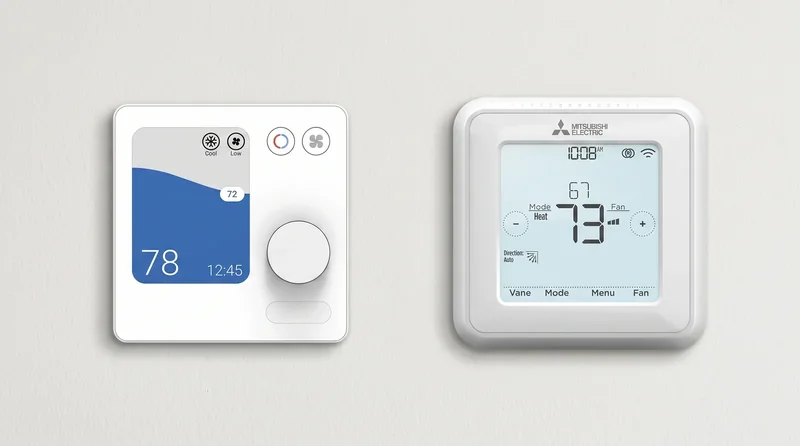
- You run ecobee or Nest everywhere and want one app, one schedule, one sensor ecosystem. Standardization is a legitimate reason to spend $230+. You'll trade vane control and diagnostics for it, and you should know that going in.
- You're on a PAA intelli-HEAT dual-fuel system. The 445 and later are built for it and ship with the PAA harness; the 444 isn't compatible. This is the case where a conventional stat is the design intent, not a workaround.
- You want a screen on the wall and no cloud. Skip the interface. The PAC-SDW01RC-1 is $179, needs no transformer and no thermostat purchase, and keeps full native control. The wall-controller comparison covers the trade.
- You want app control, Siri, or Home Assistant for the least money. A CN105 controller board is $35 and keeps everything the interface throws away — vane, live diagnostics, the factory remote. You flash it from your browser and pick one of two free, open-source firmwares: ESPHome for Home Assistant, or an Apple Home compatible build for Siri. Neither is MFi-certified, so the Home app shows an "Add Anyway" prompt once. Both run fully local, no account.
- Your Nest is the one thing you refuse to give up, and you have one head. Be honest with yourself about the total: interface, transformer, wire, labor. Then compare it to $35 and a different app.
The Short Version
Yes, a Nest or an ecobee can run a Mitsubishi mini-split. Mitsubishi builds the adapter, documents it properly, and even keeps the compressor modulating on stage-1 calls — which is more than the internet gives it credit for.
What you're really buying is a translation layer that only speaks in on and off. The heat pump keeps its intelligence; your thermostat just loses the vocabulary to direct it, and you lose the wall controller and every diagnostic the port can carry.
If you're weighing it:
- Check your model against the compatibility data — the interface needs a working CN105 port, and so does everything else here.
- Ask your distributor which part number is current for your unit, and get the compatibility chart for your model revision.
- Price the whole job — module, transformer, wire, labor — not just the module.
- Compare that number against a $179 wall controller and a $35 board before you commit.
The interface doesn't teach your Nest to speak heat pump. It teaches your heat pump to answer to a furnace's vocabulary — and charges you $230 for the translation.
Related
- The best smart thermostat for a mini-split
- Every smart-control option compared
- Check your unit for a CN105 port
- The local CN105 controller
Next step
Check your unit first
Type your indoor unit's model number for a verdict in under a minute. If it fits, the firmware flashes in the browser in about two minutes.