 serin labs
Every Way to Make a Mitsubishi Mini-Split Smart, Compared (2026)
Four real options · $35 to $475 per indoor unit
You can use Mitsubishi's app, put a thermostat on the wall, add a plug-in infrared controller, or connect directly to the mini-split. This guide shows what each route costs, what it can do, and where it falls short.
- Typical prices
- Setup difficulty
- Cloud vs. local
- Honest limitations
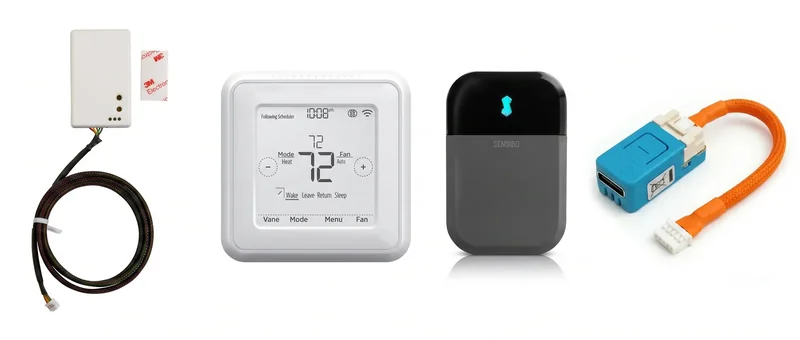 Official app · Wall control · Infrared · Direct local control
Quick Answer: Which Smart Controller Should You Buy?
There isn't one right answer for every home. The best choice depends on whether you value official support, a wall screen, the easiest possible installation, or the most capability for the money.
Official route
Mitsubishi Wi-Fi adapter
About $227Choose this when you want Mitsubishi's own app and support, and you are comfortable depending on its cloud service.
- One adapter per indoor unit
- Kumo Cloud or MELCloud app
- Mitsubishi account required
Best physical control
MHK2 or wired wall controller
$179–$475Choose this when a familiar thermostat on the wall matters more than phone or voice control.
- No network needed for basic control
- Measures temperature at room height
- App control costs extra
Easiest installation
Sensibo, Cielo, or similar
About $79–$139Choose infrared when you rent, cannot open the mini-split, or want setup with no HVAC wiring.
- Works with many mini-split brands
- Needs line of sight and an outlet
- Cannot read the unit's real status
Best value for compatible units
Serin Controller
From $35Choose direct local control when you want an app, Siri or Home Assistant, and real unit feedback without a cloud account.
- Two-way connection to the mini-split
- No account or monthly fee
- Requires opening the unit once
My short recommendation: if you own a compatible Mitsubishi-family unit and are comfortable turning off the breaker and opening its cover once, the Serin Controller gives you the most capability for the least money. Renters should start with infrared. People who specifically want a thermostat on the wall should buy a wall controller. Buyers who only trust factory-supported hardware should choose Mitsubishi's Wi-Fi adapter.
Start here
Are you comfortable opening the indoor unit?Yes, keep going
No Infrared controllerSensibo, Cielo, or similar · about $79 to $139Do you want a thermostat on the wall?No, keep going
Yes Wall controllerMHK2 or PAC-SDW01RC-1 · $179 to $475Do you want manufacturer hardware and official support?No, keep going
Yes Mitsubishi Wi-Fi adapterMAC-587IF-E · about $227, Mitsubishi account Serin ControllerFrom $35 · no account, no monthly feeCheck Compatibility Before You Compare Prices
The Mitsubishi Wi-Fi adapter, both wall controllers, and the Serin Controller connect to a small service port called CN105 inside the indoor unit. Most Mitsubishi Electric mini-splits from roughly the last 15 years have it, but there are exceptions. A few newer systems provide another connector for the factory Wi-Fi adapter; check the documentation for your exact model before assuming two wired accessories can share the unit.
Infrared controllers do not use CN105. They work by sending the same signals as the handheld remote, so they are the fallback for unsupported models and other mini-split brands.
Before you buy a wired option
Does your indoor unit have the right connection?
Enter the model number from the label on the indoor unit. The checker covers Mitsubishi Electric plus many Mitsubishi-built Trane and American Standard systems.
The Four Ways to Make a Mitsubishi Mini-Split Smart
The four products do not simply provide the same controls at different prices. They connect differently, rely on different services, and solve different household problems.
1. Mitsubishi's Wi-Fi Adapter: The Official App
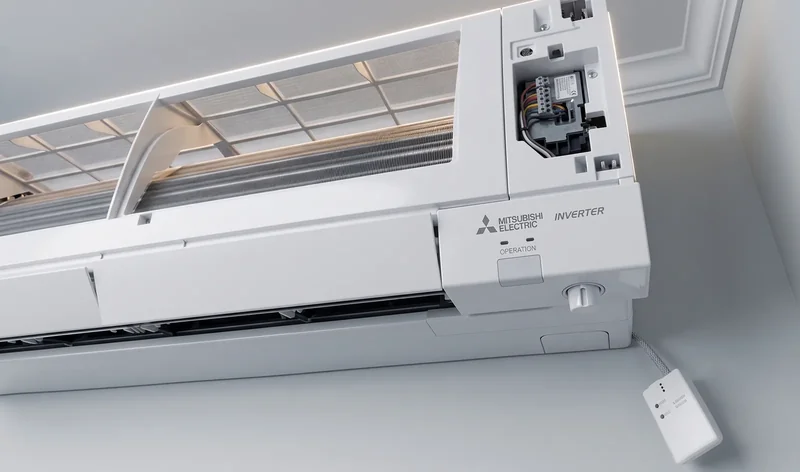
The MAC-587IF-E is Mitsubishi's factory answer to phone control. It plugs into the indoor unit and connects it to Kumo Cloud in North America or MELCloud in many other markets. Setup, schedules, and remote access run through Mitsubishi's app, and you need a Mitsubishi account.
Retail pricing is around $227 per indoor unit. Its advantage is straightforward: it is the manufacturer's own hardware, designed for the equipment and backed through official support channels. If that support relationship matters more to you than cost or cloud dependence, this is the safest choice.
The trade-off is that setup, remote access, and schedules depend on Mitsubishi's service; control from inside the house stays on your Wi-Fi. Multi-zone costs also climb quickly because every indoor unit needs an adapter. The Kumo Cloud alternative guide looks more closely at that choice.
2. Mitsubishi Wall Controllers: A Real Thermostat on the Wall
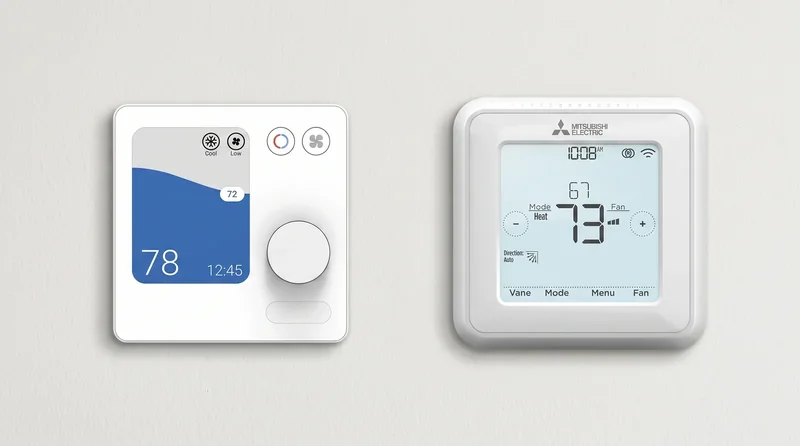
The MHK2 and PAC-SDW01RC-1 are for households that want a familiar thermostat rather than another app. They put the temperature sensor at room height, provide a physical screen, and continue working without a network.
The wired PAC-SDW01RC-1 runs about $179. The wireless MHK2 is generally $415–$475. Neither gives you phone control by itself; adding that usually means buying Mitsubishi's Wi-Fi adapter too.
That cost can still make sense in a rental, guest space, or household where anyone should be able to adjust the temperature without finding a phone. The wall-controller comparison covers the differences between the two.
3. Sensibo, Cielo, and Other Infrared Controllers: No Cover to Open
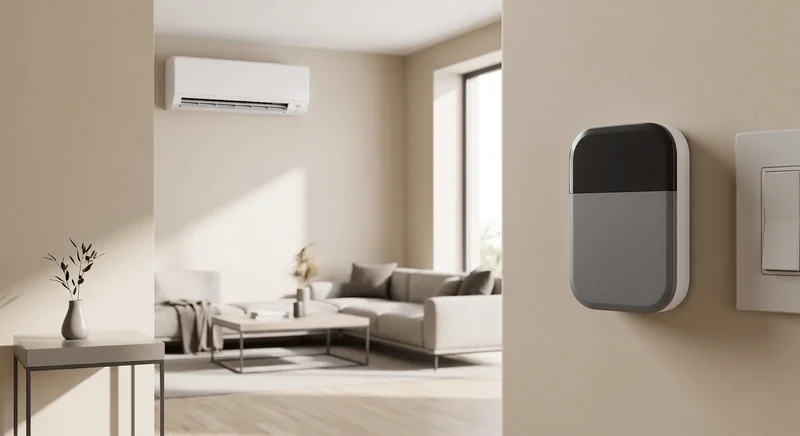
Infrared controllers are the easiest option to install. A Sensibo, Cielo, or similar device sits in the room, connects to Wi-Fi, and sends the same infrared commands as the factory remote. Sensibo and Cielo models typically run about $79–$139, depending on the model and current promotions.
This is the honest recommendation for renters, unsupported mini-split brands, and anyone who does not want to open HVAC equipment. It needs a power outlet and a clear view of the indoor unit, but it can be running without touching the mini-split itself.
The limitation is communication. Infrared is one-way: the controller sends a command and assumes the unit received it. If someone uses the handheld remote, the app's displayed setting can drift from the actual setting. It also cannot read compressor information, error codes, or other internal operating data. The infrared-controller guide explains when that matters.
Infrared
Sends only
Out of sync It can send a command, but nothing comes back. The app keeps showing the last setting it sent, not the one the unit is running.
Direct connection
Sends and reads back
In sync The same wire carries commands out and the unit's own state back, so a change made on the handheld remote shows up in the app.
4. The Serin Controller: Direct, Local Control
The Serin Controller is a compact ESP32 board with a cable that plugs into the indoor unit's CN105 service connection. That creates a two-way serial link: the controller sends commands and reads back temperature, mode, fan state, error information, and other operating data exposed by the unit.
You connect it to a computer over USB and install one of the supported free, open-source firmware options from a browser. Choose ESPHome for Home Assistant, or an Apple Home-compatible build for Siri and the Home app. The hardware does not normally ship with either firmware pre-installed. Neither route requires a Serin account, cloud service, or recurring fee.
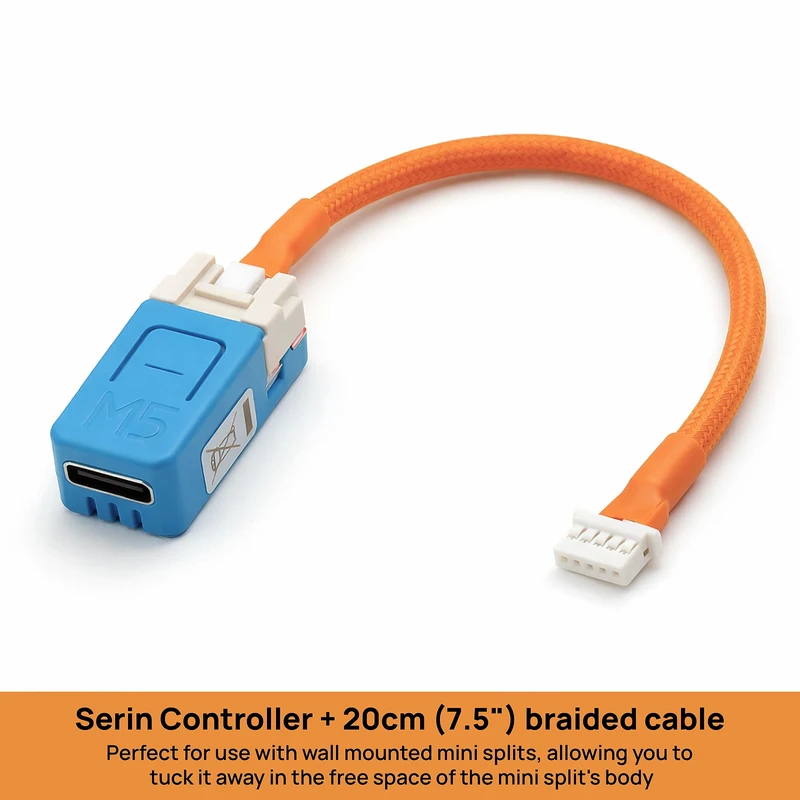
Price: from $35 pre-assembled, or roughly $15–20 when built from the parts list.
Best for: compatible Mitsubishi-family units where local app, Siri, or Home Assistant control matters more than a physical wall screen.
Installation: turn off the breaker, open the indoor unit, and connect one keyed plug. There is no soldering or wire cutting.
Limitation: it is not a wall thermostat, and it uses the same internal service connection as most Mitsubishi wired accessories.
The handheld infrared remote continues to work. Because the connection reads the actual mini-split state, changes made with that remote remain visible in the app. The pre-assembled version costs from $35; the DIY parts route is approximately $15–20.
Side-by-Side Smart Controller Comparison
Prices below are per indoor unit. Multi-zone systems need one controller or adapter for each head you want to control.
| Mitsubishi Wi-Fi adapter | Mitsubishi wall controller | Sensibo / Cielo (IR) | Serin Controller | |
|---|---|---|---|---|
| Typical price | ~$227 | $179–$475 | ~$79–$139 | From $35, or $15–20 DIY |
| Connection | Internal service port | Internal service port | Infrared across the room | Direct CN105 connection |
| Installation | Open indoor unit | Open indoor unit | Plug in; no cover removal | Open indoor unit |
| Physical wall screen | No | Yes | Some models | No |
| Phone control | Mitsubishi app | Only with extra adapter | Vendor app | Built-in UI, Apple Home, or Home Assistant |
| Reads actual unit state | Limited | Limited | No | Yes |
| Cloud or account required | Yes | No for basic control | Usually yes | No |
| Works with many brands | No | No | Yes | Mitsubishi-family units only |
| Keeps handheld remote working | Yes | Yes | Yes, but app may drift | Yes, with state kept in sync |
Best value for a compatible unit
Serin Controller
The board and tested cable arrive assembled. You select and install the free firmware that matches your smart-home platform from a supported browser; nothing needs to be soldered or compiled.
From $35 · Free US shipping · 5.0 from 42 reviews
Who Should Buy What?
- Buy the Mitsubishi Wi-Fi adapter when official hardware and manufacturer support are worth more to you than the price or cloud dependence.
- Buy the MHK2 or PAC-SDW01RC-1 when you want a thermostat anyone can use from the wall without a phone or network.
- Buy a Sensibo, Cielo, or similar infrared controller when you rent, own another mini-split brand, or do not want to open the unit.
- Buy the Serin Controller when you have a compatible Mitsubishi-family unit and want local app, Siri, or Home Assistant control with real unit feedback for the lowest price here.
One important constraint: wired options commonly compete for the same service connection. Do not assume you can install the Wi-Fi adapter, a wall controller, and the Serin Controller together. Infrared controllers are the exception because they never connect to the control board.
What Does a Multi-Zone System Cost?
Every indoor head is its own controllable zone. That means a three-head system generally needs three Wi-Fi adapters, three infrared controllers, or three Serin Controllers. The wall-controller configuration depends on the equipment and the kind of room control you want.
Using the per-head figures above, three pre-assembled Serin Controllers start at $105. Three Mitsubishi Wi-Fi adapters at roughly $227 each come to about $681. Those figures do not include professional installation. The multi-zone guide covers cable choices, naming, and the limits imposed by the shared outdoor unit.
The Honest Limits of the Lowest-Cost Route
The Serin Controller is the strongest value for a compatible unit, but it is not the answer for everyone:
- It works with compatible Mitsubishi Electric systems and many Mitsubishi-built Trane and American Standard ductless units, not every mini-split brand.
- You must turn off power and open the indoor unit once to connect it. Hire an HVAC technician if you are not comfortable doing that.
- You install the firmware from a desktop or laptop using Chrome, Edge, or Brave. It is a short guided process, but it is still a step the official adapter does not ask you to do.
- The Apple Home-compatible firmware is free and open source, but it is not MFi-certified. Apple displays an “Add Anyway” message once during pairing.
- It has no physical display. If a wall thermostat is the requirement, buy the wall thermostat.
The Short Version
The four choices optimize for four different things:
- Official support: Mitsubishi Wi-Fi adapter.
- A physical wall screen: MHK2 or PAC-SDW01RC-1.
- The easiest installation: Sensibo, Cielo, or another infrared controller.
- Local control and the most capability per dollar: Serin Controller.
If the fourth option sounds like your home, the next steps are simple:
- Check your indoor-unit model.
- Get the pre-assembled Serin Controller or the DIY parts, one per indoor unit.
- Install the free firmware from the browser installer and follow the setup guide for your platform.
You do not need to make the most expensive choice to make a Mitsubishi mini-split smart. You need the connection method that matches how your household will actually use it.
Related
- Check your unit for a CN105 port
- See the Serin Controller
- The best Kumo Cloud alternative
- Cheaper alternative to the MHK2
Next step
Check your unit first
Type your indoor unit's model number for a verdict in under a minute. If it fits, the firmware flashes in the browser in about two minutes.