 serin labs
ratgdo, HeishaMon, and the Case for Controlling Your Own Appliances
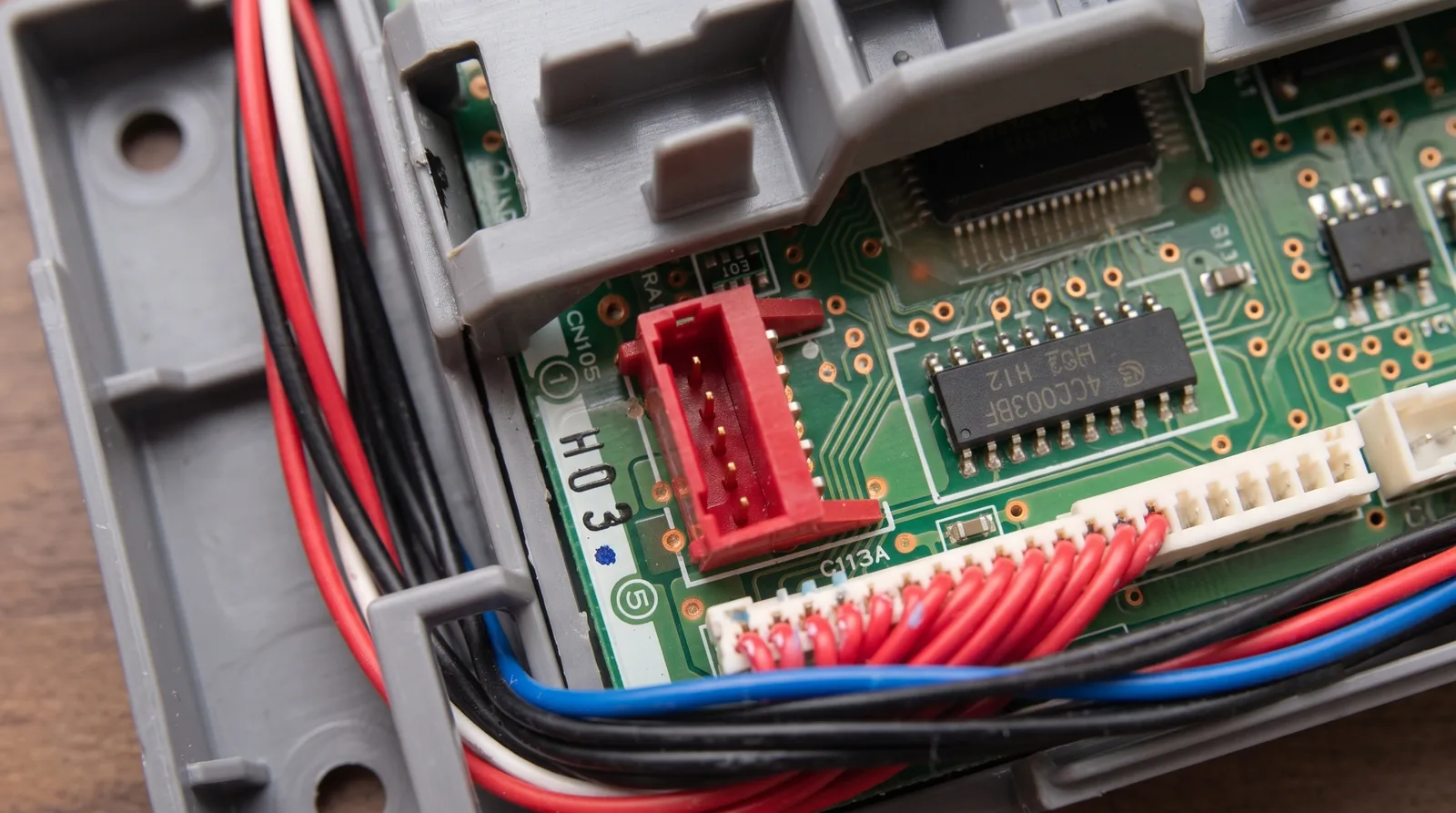
The first time I took the front cover off a Mitsubishi indoor unit, I wasn't looking for a hack. I was looking for a connector the manual doesn't mention, on a board the manual doesn't show. It's right there in the silkscreen, five pins, usually empty: CN105.
That connector isn't an oversight, and it isn't a debug header somebody forgot to remove. It's where Mitsubishi's own Wi-Fi adapter plugs in. Once you notice that, you start seeing the same arrangement in appliances that have nothing to do with each other.
Here's the pattern. A manufacturer builds an accessory port into the product, because its own add-on has to attach somewhere. It sells you a dongle that plugs into that port and routes your commands through its servers. Somebody buys the dongle, watches the wire, and writes down what they see. Then somebody else builds a small board that speaks the same language and answers to nobody.
Garage doors have ratgdo. Panasonic has HeishaMon. Mitsubishi has CN105. This post is about what they share, and — the more useful half — where the pattern tends to break.
Quick Facts
- The recurring shape: OEM accessory port, plus OEM cloud dongle, plus somebody's protocol notes, equals a local replacement
- ratgdo (Chamberlain / LiftMaster): Paul Wieland. Handles Security+ 2.0, Security+ 1.0, and dry contact. GPL-2.0
- HeishaMon (Panasonic Aquarea): connects to the CN-CNT or CN-NMODE socket. Replaces Panasonic's CZ-TAW1 Wi-Fi module. No license file in the repo
- CN105 (Mitsubishi): SwiCago/HeatPump is the reference implementation. Ships GPL-3.0 license text; its README says LGPL-3.0
- Where it breaks: abandonment, protocol drift, missing licenses, and your warranty
The Four Steps, Every Time
Step one: the port exists before anyone hacks anything. Manufacturers need a place to attach their own optional accessories, so they design one in and label it on the board.
Step two: the manufacturer sells an adapter for that port, and the adapter talks to a cloud service. You get an app, an account, and a dependency on somebody else's servers staying up.
Step three: one person reverse-engineers the protocol and publishes what they found. This is the step that costs real time, and it's almost always uncompensated.
Step four is the easy one. Once the protocol is written down, replacement hardware is a microcontroller and a cable. The hard part was never the electronics.
Three Projects, One Shape
| Project | Appliance | Where it connects | What it displaces | License | Hosted on |
|---|---|---|---|---|---|
| ratgdo | Chamberlain, LiftMaster, Merlin openers | The opener's own control-board terminals | The myQ app | GPL-2.0 | GitHub |
| HeishaMon | Panasonic Aquarea heat pumps | CN-CNT or CN-NMODE socket | The CZ-TAW1 Wi-Fi module | No license file | GitHub |
| SwiCago/HeatPump and its forks | Mitsubishi Electric indoor units | CN105, a 5-pin JST connector | The Kumo Cloud / MELCloud adapter | GPL-3.0 text, LGPL-3.0 README | GitHub |
One honest asterisk on that table. ratgdo isn't quite a service-port project — it wires to the red, white and black terminals on the opener's own control board, the same ones the wall button uses. Same outcome, slightly different door in.
Why the Port Is There in the First Place
It's worth being clear that none of this is an exploit. The manufacturer put a labelled connector on the board and sold an accessory for it. The community just built a different accessory.
Mitsubishi's MAC-587IF-E adapter, the one that makes Kumo Cloud and MELCloud work, plugs into CN105. Panasonic's CZ-TAW1 plugs into the Aquarea's service socket — HeishaMon's own documentation notes that swapping is "only a matter of plugging the cable out from CZ-TAW1 and reconnecting to your HeishaMon device." The physical interface was designed to be used.
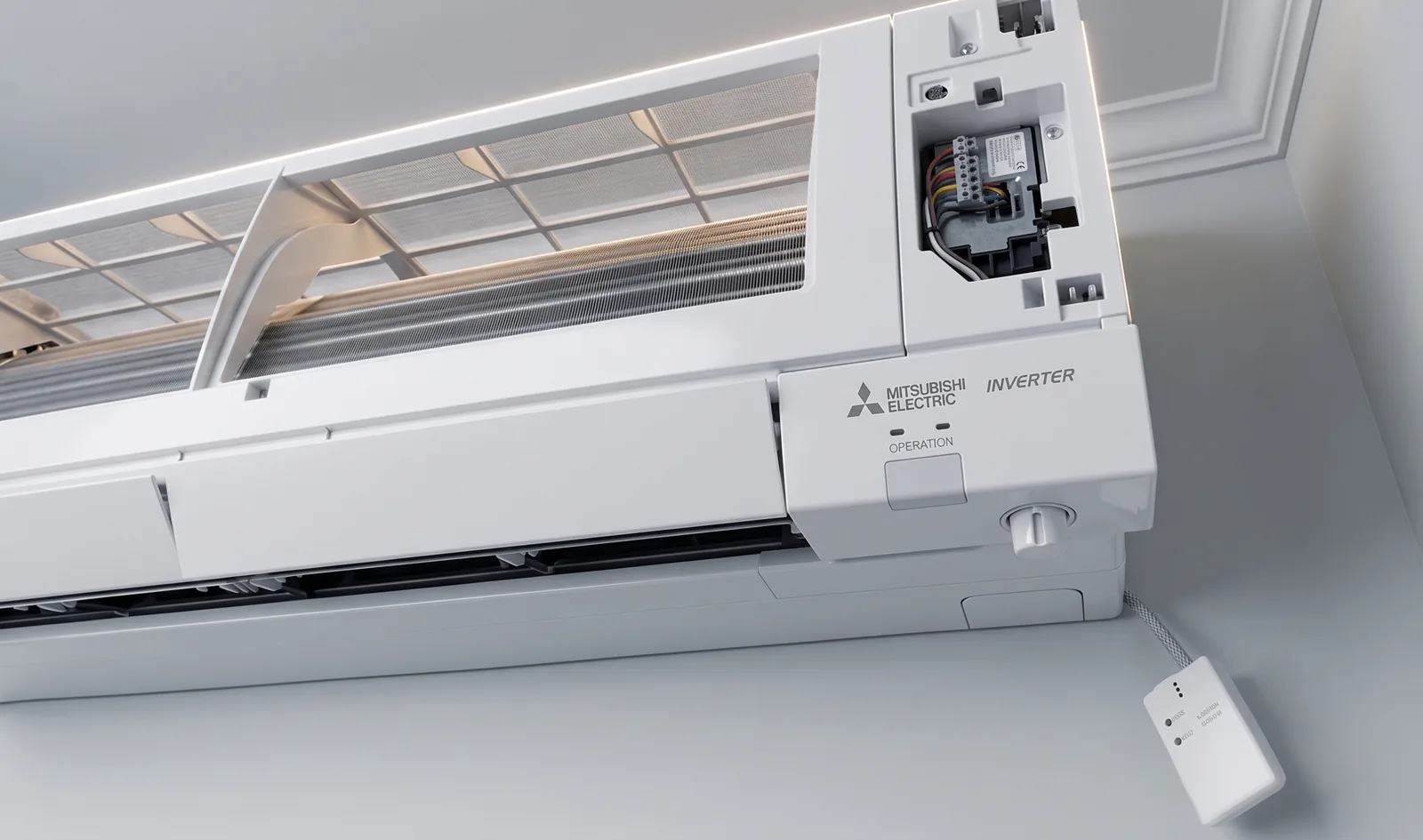
What the community changed is where the commands go. The port stayed the same. The server on the other end disappeared.
ratgdo, and What Happens When the Cloud Closes
The garage-door version of this story is sharper, because you can date it. In November 2023, Chamberlain Group said publicly it would "prevent unauthorized usage of our myQ ecosystem through third-party apps." Home Assistant removed its myQ integration in the 2023.12 release, on 6 December 2023.
The Home Assistant announcement is quotable: "We are playing a game of cat and mouse with MyQ and right now it looks like the cat is winning." That's what a cloud API dependency looks like when the vendor decides it's done.
What survived was the wire. The same post pointed readers at ratgdo, describing it as "a fully local, ESPHome-based, solution that is compatible with MyQ's security+ protocol and can be installed on an existing MyQ system by connecting three wires." The hardware is Paul Wieland's, GPL-2.0, and the ESPHome firmware is a separate GPL-2.0 repo under the ratgdo organisation.
One vendor closed a documented API and thousands of integrations died the same week. The physical terminals on the opener were unaffected, because there was nobody to switch them off.
CN105, the Oldest Lineage and the Most Forked
The Mitsubishi side has the longest paper trail, and it's worth naming the people in it. SwiCago/HeatPump is the Arduino library that made CN105 usable, and every ESPHome component on this port descends from it. It's a 5-position JST connector carrying serial, and it can also power the board it's talking to.
SwiCago's own README credits earlier work, and the detail there is a small warning in itself. It thanks "Hadley in New Zealand" for a blog post "describing baud rate and details of cn105," then links the original URL — followed immediately by a Wayback Machine link, because the site no longer exists.
The lineage runs SwiCago/HeatPump, then geoffdavis/esphome-mitsubishiheatpump, then echavet/MitsubishiCN105ESPHome, which is the component our own ESPHome builds use. We didn't originate any of it. The full chain, with licenses, is on our licenses page, and I'd rather over-attribute than under-attribute here.
Where It Tends to Break
This is the part the enthusiastic version of this article skips. The pattern works, but it fails in predictable ways, and you should know which one is coming for you.
| How it breaks | What you'd see | A concrete example |
|---|---|---|
| Abandonment | The repo's still open, but nothing's landed in a long time | SwiCago/HeatPump has had no pushes since September 2024, though its forks stay active |
| Protocol drift | A newer model speaks something the project doesn't | Chamberlain's Security+ 1.0 and 2.0 needed separate support work in ratgdo |
| License ambiguity | No LICENSE file, or one that disagrees with the README | HeishaMon and MitsubishiCN105ESPHome ship no license file at all |
| Warranty exposure | Your installer asks what that board is | Not a project failing — but it's yours to carry |
Abandonment is the one people underestimate. These projects usually have one person who understands the protocol and a queue of issues nobody else can close. That isn't a criticism of the maintainers; it's arithmetic.
Protocol drift is slower and quieter. A manufacturer ships a new generation, the framing changes, and last year's notes describe last year's firmware. Chamberlain's two Security+ generations are the visible version of this — each one was separate work for the project, not a free upgrade.
And warranty is genuinely on you. Our own compliance page says it plainly: connecting third-party accessories may affect your equipment warranty, and you should check with your installer or the manufacturer if you're unsure. That's not boilerplate we can wave away, and neither can anyone else in this article.
The Licensing Is Softer Than It Looks
For a category built on open source, the licensing here is inconsistent. ratgdo is the clean one: a GPL-2.0 license file sitting in the repository where you'd expect it. HeishaMon has no license file at all. Neither does MitsubishiCN105ESPHome, the component a lot of Mitsubishi installs are running right now.
SwiCago's HeatPump has a subtler problem: the repository ships the GPL-3.0 license text, while the README says LGPL-3.0. Those are different in a way that matters if you're linking against it commercially.
We hit this ourselves, which is why our licenses page is longer than it probably should be. The Apple Home compatible firmware isn't Serin Labs copyright — it's built on Espressif's esp-homekit-sdk, under the Espressif MIT License with mu_srp under Apache-2.0, on top of ESP-IDF under Apache-2.0. We package and flash things other people wrote. Saying so costs nothing and it's the accurate description.
If you're picking a project to depend on, read its LICENSE file before you read its feature list. It takes thirty seconds and it tells you what you're actually signing up for.
Where This Leaves You
Every entry here is somebody choosing to keep a physical connection instead of a revocable one. That's the whole argument, and it holds up better than most smart-home arguments do.
- You have a Chamberlain or LiftMaster opener. ratgdo, three wires, GPL-2.0. Home Assistant recommended it themselves when myQ closed.
- You have a Panasonic Aquarea. HeishaMon replaces the CZ-TAW1 on the same socket. Note the missing license file before you build on it.
- You have a Mitsubishi mini-split. That's the CN105 stack above, and Serin Labs is one packaging of it — a board and cable you flash yourself from a browser. The firmware is other people's work, and we say so on every page.
- Your appliance isn't on this list. Search the connector, not the brand. "CN105", "CN-CNT" — those queries find projects that a brand name never will.
If you want to check whether your own hardware is in this pattern:
- Kill power at the breaker, take the cover off, and photograph the control board. Every labelled connector is a lead.
- Search that label alongside "ESPHome", "MQTT", or "Home Assistant" before you buy anything. The port is worthless without somebody's protocol notes.
- Open the project's LICENSE file and its commit history. One tells you what you can do with it, the other tells you whether anyone's still home.
- Check your warranty terms, and decide with your eyes open rather than after the fact.
The connector was always yours. Somebody just had to write down what it says.
Related
- Firmware licenses and attribution
- ESPHome vs Apple Home firmware
- Leaving Kumo Cloud behind
- Check your unit for a CN105 port
Next step
Check your unit first
Type your indoor unit's model number for a verdict in under a minute. If it fits, the firmware flashes in the browser in about two minutes.