 serin labs
Your Mitsubishi Is Blinking. Here's How to Read It.
You walked past the indoor unit and the little light is blinking. It wasn't doing that last week. Now you're on your phone at 10pm working out whether this is a $0 problem or a $2,000 one.
Here's the first thing nobody leads with: on a lot of Mitsubishi wall units, a blinking light is normal. It means the room is nearly at your setpoint. When it isn't normal, the blink count means something specific — and which specific thing depends on your model's manual.
So I read those manuals. Every table below carries the number it came from, and I'll say plainly where this post stops.
Quick Facts: Mitsubishi Blinking Lights
- A blinking light is often normal. On MSZ-FS units, service manual OBH872A lists a blinking operation indicator as "the room temperature is approaching the set temperature," about 2 to 4°F (1 to 2°C) from setpoint.
- A fault blink comes with the fan stopping. The manuals state that on detecting an abnormality, "the indoor fan motor turns OFF and OPERATION INDICATOR lamp blinks."
- Fault blinks are counted in groups, separated by a 2.5-second pause: 2 = thermistor, 3 = indoor fan motor, 4 = indoor control system, 5 = outdoor power system, 6 = outdoor thermistors, 7 = outdoor control system, 14 or more = other. A continuous 0.5-second on/off blink means miswiring or serial signal.
- Count at least two full cycles before you decide what you saw. The manuals say so directly.
- Letter codes (P1, P5, E6, U2) come from a wired remote controller, not from the blinking lamp. Ceiling cassettes such as the SLZ-KF series list them in manual TCH118.
- Codes vary by model. Find your own model number and its service manual before acting on any table, including this one.
Why Is My Mitsubishi's Operation Light Blinking?
Mitsubishi's documentation calls it the OPERATION INDICATOR lamp. Plenty of people search for it as the green light.
On the MSZ-FS series (manual OBH872A, covering MSZ-FS06NA through MSZ-FS18NA), the indicator has three normal states. Lit means the unit is working to reach your setpoint, about 4°F (2°C) or more away. Blinking means the room temperature is approaching the set temperature, roughly 2 to 4°F (1 to 2°C) out. Not lit means standby, and the manual notes that state only occurs during multi-system operation.
So a blinking light on a unit that's running normally is the most boring possible outcome.
Normal Blink or Fault Blink? One Question Settles It
Ask yourself whether the unit is still blowing air.
OBH872A opens its check table with this: "When the indoor unit has started operation and detected an abnormality of the following condition (the first detection after the power ON), the indoor fan motor turns OFF and OPERATION INDICATOR lamp blinks." A fault blink and a dead fan arrive together.
That gives you a clean split. Blinking, fan running, room close to setpoint? Normal. Blinking with the fan stopped, or nothing responding at all? Now the count matters.
One detail before you count. In the MSZ-FS and MSZ-FH manuals the fault appears on "the left lamp of the OPERATION INDICATOR lamp." In the MSZ-GE and MSY-GE manual it's the upper lamp. Same numbering, different geometry.
What Each Blink Count Means on a Wall-Mounted MSZ Unit
This is section 9-4, "TROUBLESHOOTING CHECK TABLE." I checked three manuals and the numbering is identical in all three: OBH872A (MSZ-FS06–18NA), OBH683E (MSZ-FH06–18NA), and OBH548D (MSZ-GE and MSY-GE series).
| Blink pattern | Abnormal point | What the manual says triggers it |
|---|---|---|
| Continuous, 0.5 s on / 0.5 s off | Miswiring or serial signal | Serial signal from the outdoor unit not received for 6 minutes. Indoor and outdoor units don't operate. |
| 2 blinks, 2.5 s pause | Indoor coil thermistor or room temperature thermistor | Thermistor short or open circuit |
| 3 blinks, 2.5 s pause | Indoor fan motor | Rotational frequency feedback signal not emitted during fan operation |
| 4 blinks, 2.5 s pause | Indoor control system | Can't read data in the indoor control board's nonvolatile memory |
| 5 blinks, 2.5 s pause | Outdoor power system | Compressor stopped 3 times in a row for overcurrent or start-up failure protection, within 1 minute of start-up |
| 6 blinks, 2.5 s pause | Outdoor thermistors | Outdoor thermistor short or open circuit during compressor operation |
| 7 blinks, 2.5 s pause | Outdoor control system | Can't read data in the inverter or outdoor control board's nonvolatile memory |
| 14 or more blinks, 2.5 s pause | Other abnormality | Something outside the list above |
| Lamp lit steady, outdoor unit dead | Outdoor control system | Can't read data in the inverter or outdoor control board's nonvolatile memory |
The pause is your delimiter. Count the blinks between two 2.5-second gaps, then confirm on a second cycle. The manuals tell servicers to "check at least 2 consecutive blinking cycles," and that holds from your sofa too.
Note what's missing: no 1-blink, nothing from 8 through 13. If you counted one of those, you were reading a different table — which is what ruins most answers online.
The Second Blink Table That Makes Forum Answers Wrong
Mitsubishi wall units have a second diagnostic mode. Section 9-2 of OBH872A and OBH683E describes a failure mode recall function: the unit memorizes a fault that already happened, and a technician plays it back with a button sequence on the handheld remote.
It uses the same lamp. It uses different numbers. The manual flags this itself, in a note directly under the table: "Blinking patterns of this mode differ from the ones of TROUBLESHOOTING CHECK TABLE (9-4.)."
| Blinks in recall mode | Abnormal point (per OBH872A / OBH683E) |
|---|---|
| Not lit | Normal |
| 1 blink every 0.5 s | Room temperature thermistor |
| 2 blinks | Indoor coil thermistor |
| 3 blinks | Serial signal |
| 6 blinks | i-see sensor (listed separately, units with one) |
| 11 blinks | Indoor fan motor |
| 12 blinks | Indoor control system |
Put the two tables side by side and the problem is obvious. Three blinks means the indoor fan motor in the live table and the serial signal in the recall table. Six means outdoor thermistors in one and the i-see sensor in the other. A blink count with no table attached is worth nothing.
I'm describing recall mode rather than walking you through it. It's a service procedure that changes the unit's state, and the manual warns: "Make sure to release the failure mode recall function after it is set up, otherwise the unit cannot operate properly." Leave it to your technician.
Wired and Cassette Units Show Letter Codes Instead
If you searched "Mitsubishi error codes" and expected P5 or U2, you have a different class of unit in mind. Those are check codes, and they come from a wired remote controller rather than a blinking lamp.
Take the SLZ-KF ceiling cassettes. Technical & service manual TCH118, Revised Edition-A, August 2023, covers SLZ-KF09NA1 through SLZ-KF18NA1. It states that "present and past check codes are logged, and they can be displayed on the wired remote controller or controller board of outdoor unit." On the wireless remote, the unit self-checks and reports the same code as a count of blinks and beeps.
Here's the indoor-unit half of that table, TCH118's "Output pattern A":
| Blinks / beeps | Check code | Symptom |
|---|---|---|
| 1 | P1 | Intake sensor error |
| 2 | P2, P9 | Pipe (liquid or 2-phase pipe) sensor error |
| 3 | E6, E7 | Indoor/outdoor unit communication error |
| 4 | P4 | Float switch connector open |
| 5 | P5 / PA | Drain pump error / forced compressor error |
| 6 | P6 | Freezing (cooling) or overheating protection (heating) |
| 7 | EE | Assembly error (system error) |
| 8 | P8 | Pipe temperature error |
| 9 | E4, E5 | Communication error between wired remote controller and indoor unit |
| 11 | PB (Pb) | Indoor unit fan motor error |
| 12 | FB (Fb) | Indoor unit control system error (memory error, etc.) |
| 14 | PL | Refrigerant circuit abnormal |
Faults the outdoor unit raises sit in a second table, "Output pattern B," distinguished by a 3-second lamp-on before the count starts. That's where the U codes live: U2 for abnormal high discharge temperature or insufficient refrigerant, U1/Ud for abnormal high pressure, U5 for heat sink temperature, U6 for compressor overcurrent or power module trouble, U3/U4 for open or short outdoor thermistors. TCH118 adds its own caveat, and it's the same one I'd give you: "The supported check codes may vary depending on the connected outdoor unit."
Notice that "3 blinks" now means indoor/outdoor communication — a third meaning for the same count, on the same brand. That's why every table on this page carries a manual number.
What You Can Safely Check Yourself, and Where to Stop
A short list any owner can check without opening anything.
Clean or check the filters. They lift out from behind the front panel on every wall unit I've handled, and restricted airflow is one of the few causes an owner can remove.
Clear the airflow path. Nothing draped over the unit, nothing blocking the outdoor unit's coil, no snow or leaves packed against it.
Check the breaker. If the unit is completely dead rather than blinking, start there.
Replace the remote's batteries. If the unit ignores the remote but runs, that's a remote problem, not a fault code. OBH872A notes that "weak batteries may cause the remote controller malfunction," and that you should press RESET after swapping them.
Try a power cycle, once. Off at the breaker, wait, back on. If the same code returns, it's real, and repeating the cycle won't change that.
That's the list. Everything past it is a technician's job, and the manuals say so in their own remedy column: replace the indoor electronic control board, check the stop valve, check the 4-way valve, replace the inverter board. Multimeter, gauge set and license territory.
OBH872A's servicing precautions start with turning the unit off at the remote, confirming the horizontal vane is closed, then killing the breaker and unplugging it. If a fix opens with that sequence, it's not a homeowner fix. Diagnose, don't disassemble.
How to Find the Service Manual for Your Own Model
I verified four manuals for this post. Mitsubishi has hundreds, so the useful skill is finding yours.
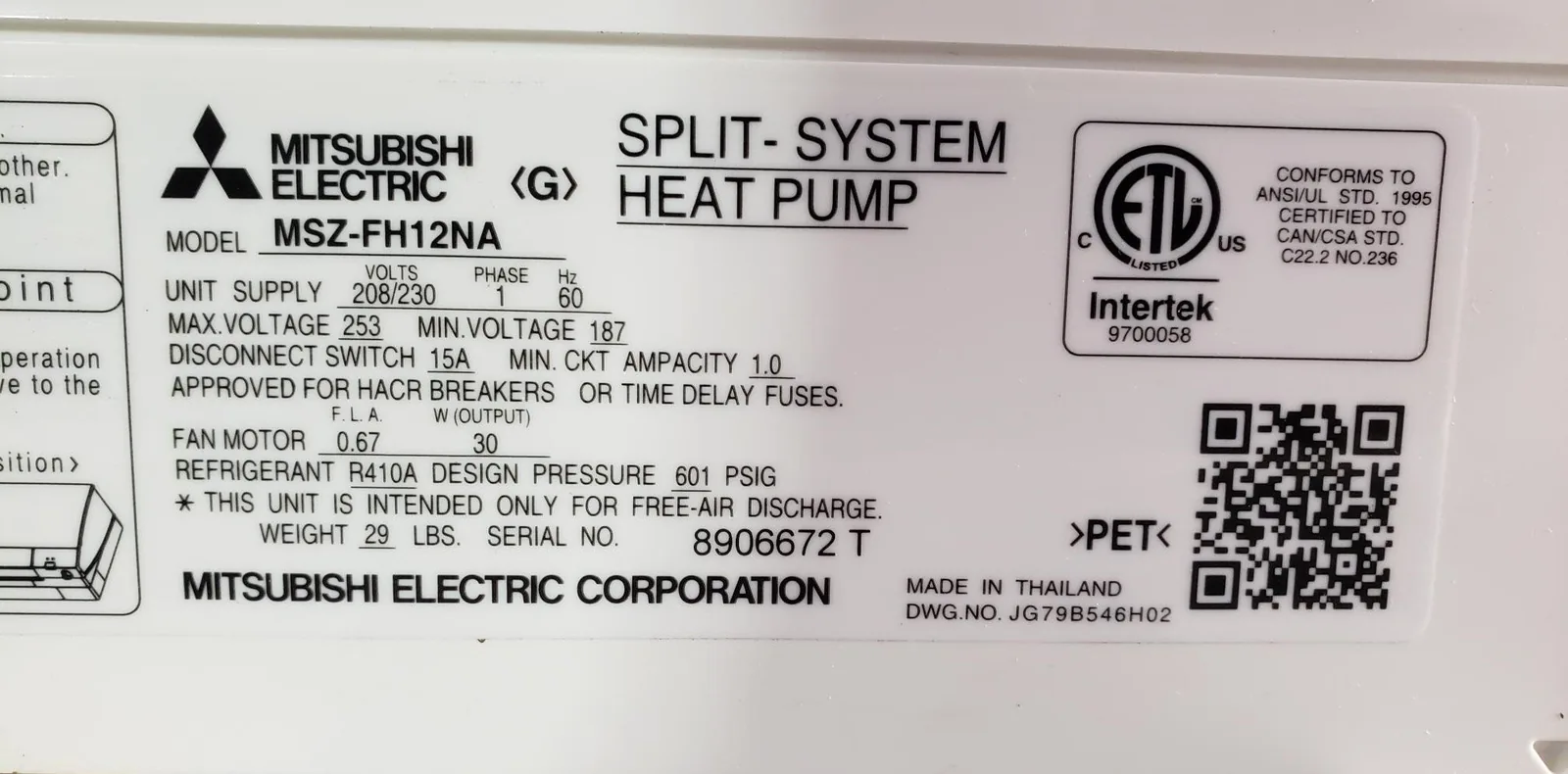
Start with the model number on the indoor unit — usually on a label behind or beside the front flap, not on the remote. Then search mitsubishitechinfo.ca for it. The manuals are public PDFs, and troubleshooting gets its own chapter: section 9 in the three wall-unit manuals above, section 8 in the cassette manual.
Two things to expect. Indoor manuals hand off outdoor faults — mine repeatedly say "refer to outdoor unit service manual" for the 5, 6 and 7 blink codes, so a full diagnosis needs both documents. And manuals get revised: OBH548 is on Revised Edition-D, OBH683 on E. Quote the revision letter when you pass a finding on.
Reading the Code Without Counting Blinks
Everything above exists because the indoor unit's only output channel is one lamp. Clever, given the constraint. It's also 2026, and counting a lamp in a dark hallway is a strange way to learn your compressor tripped.
Most Mitsubishi indoor units have a CN105 service port on the control board — the same port Mitsubishi's own Wi-Fi adapter and its MHK2 and PAC-SDW01RC-1 wall controllers plug into. It's a two-way serial link, so whatever hangs off it can ask the unit questions instead of watching a light.
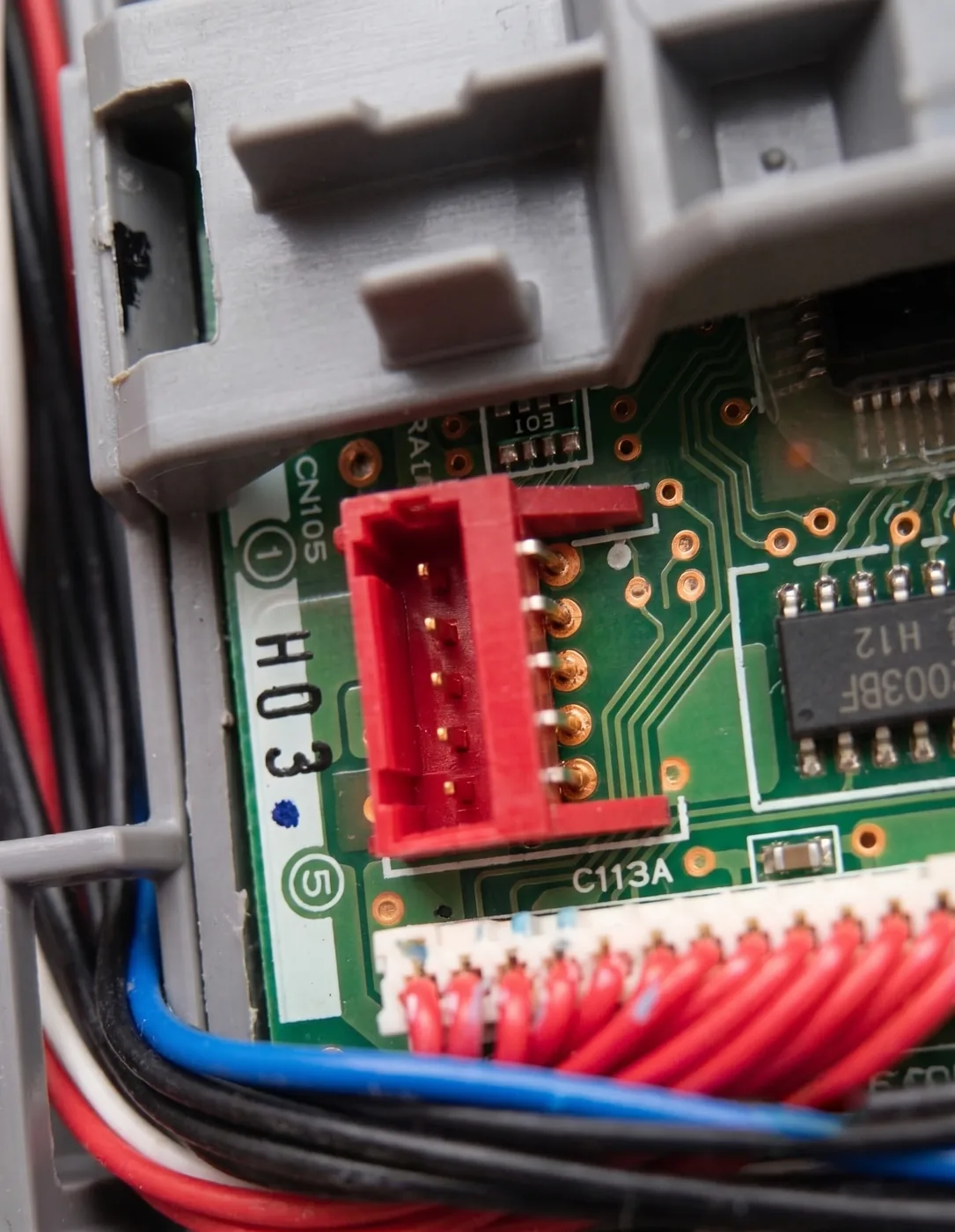
The Serin controller is a small ESP32 board on that port. Both firmwares you can flash to it — ESPHome, or the Apple Home compatible build — expose an error-code field alongside compressor frequency and runtime hours. The code becomes a value in the web UI, or an entity you can log and alert on in Home Assistant, whether or not you were standing there when it tripped.
Be clear about what that does and doesn't buy you. It reports the code your unit hands it; it doesn't diagnose the fault, and you'll still open the service manual to find out what the code means. What it removes is the counting, the guessing, and the "it was doing it earlier, I swear" conversation with your technician. The full diagnostics list and our controller troubleshooting notes cover the rest.
Who Should Do What
- Blinking, and the fan is still running. Almost certainly normal — the room is close to setpoint. Check again in an hour and get on with your evening.
- Blinking with the fan stopped, first time it's happened. Count two full cycles, note the number, check filters and airflow, power cycle once. If it returns, you have a code to hand over.
- You counted a code in the 5, 6, 7 or 14+ range. That's the outdoor unit or the refrigerant circuit. Call a technician and give them the count, your indoor model number, and the manual number if you found it.
- You have a wired controller or a cassette. Read the code off the screen — it's more precise than any blink count. Then look it up in your model's own manual.
- You'd rather never count blinks again. Check your unit for a CN105 port, then put something on it that logs the code for you.
If you're going that route:
- Confirm your indoor unit has a CN105 port.
- Get the board and cable, one per indoor unit, or the pre-assembled controller.
- Flash the firmware from your browser — ESPHome for Home Assistant, or the Apple Home compatible build for Apple households.
A blink count is a fault code with the label torn off. Find the manual that puts the label back on.
Related
- Check your unit for a CN105 port
- The controller that reports the code
- Cheaper alternative to the MHK2
- Controller troubleshooting
Next step
Check your unit first
Type your indoor unit's model number for a verdict in under a minute. If it fits, the firmware flashes in the browser in about two minutes.