 serin labs
Does Your Mitsubishi Have a CN105 Port? How to Check
Before you spend a dollar on local control, settle one thing: does your Mitsubishi have a CN105 port? Everything runs on that single connector. The controller clips onto it, the firmware talks through it, and walking away from Kumo Cloud depends on it. Get it right and the rest is easy. Get it wrong and you've bought hardware for a unit that can't use it.
The good news: you can usually answer this in about a minute, no screwdriver required. Here's how I check, fastest method first.
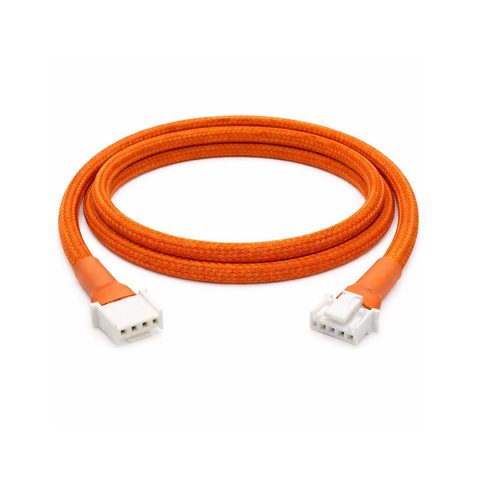
The 60-Second Check
- Run Kumo Cloud or MELCloud today? Yes → you have CN105. Done.
- No app? Read the model number behind the front flap and type it into the model checker for an instant answer. Prefixes MSZ, MSY, MFZ, MLZ, SLZ, SEZ, SVZ, PEAD, PVA, PKA, PCA, PLA, PEFY → most have CN105, but several older trims don't; the checker knows the exceptions.
- Want certainty? Pop the front panel and look for the red CN105 connector on the control board.
- Deal-breakers: Mitsubishi Heavy Industries (SRK/SRC/SRF) and air-to-water (Ecodan) units → not compatible.
What a CN105 Port Even Is
CN105 is a small 5-pin serial connector on the control board inside most Mitsubishi Electric indoor units. It's how the unit was built to talk to external controllers, and it's the port every open-source local-control project connects to, the Serin controller included. Plug in there and you speak the heat pump's native language directly. No factory app in the middle. No cloud.
One thing to be clear about up front: this is a Mitsubishi Electric part. Not every brand with "Mitsubishi" on the box has it, and that trips people up. More on that below.
The One-Minute Check: Kumo Cloud or MELCloud?
The fastest check needs no tools and no disassembly. Do you control this unit today with Mitsubishi's Kumo Cloud app (North America) or MELCloud (Europe and most of the world)?
If yes, your unit has a CN105 port. I'd bet hardware on it. Kumo Cloud and MELCloud compatibility lines up cleanly with the presence of the port, so a unit that runs on either app has the connector the controller needs. Move on to the parts.
Never set up the factory app? That doesn't rule you out. Plenty of people skip it. It just means the next check is the one that matters.
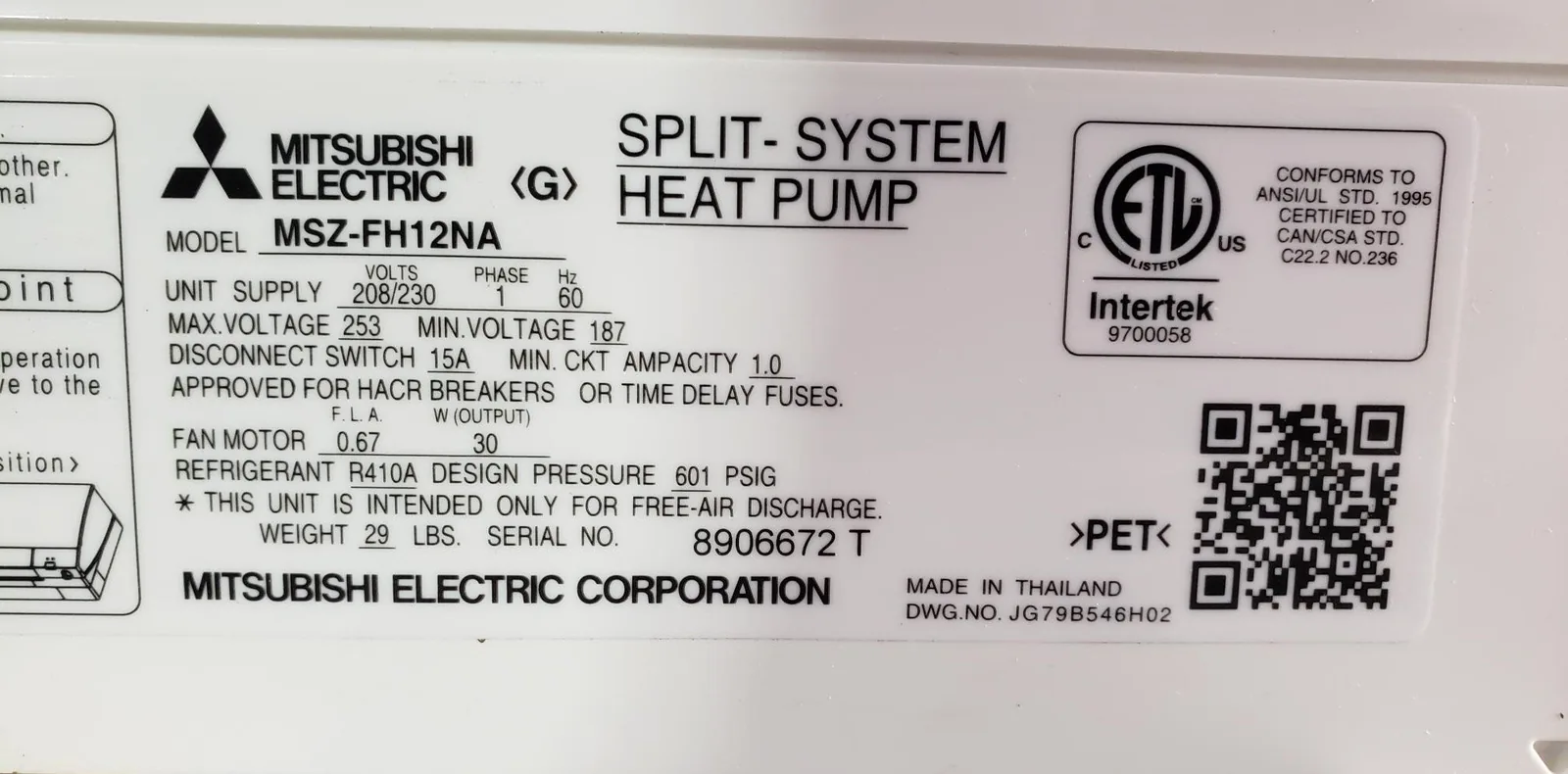
No App? Check the Model Number
Your model number sits on a label on the indoor unit, usually on the right side behind the front flap. Mitsubishi Electric indoor units start with prefixes like MSZ, MSY, MFZ, MLZ, SLZ, SEZ, SVZ, PEAD, PVA, PKA, PCA, PLA, or PEFY. Begins with one of those? It very likely has CN105, though a handful of older series and trims are the exception, which is why the checker asks for the full model number.
For most series the regional tail, the -NA or -VGK or -VG2, doesn't change the answer; the same series carries the same port whether it shipped to Ohio or Oslo. A few North American families are the exception (MSZ-FE, MSZ-GE, SEZ-KD, and several P-Series trims), where the letters after the capacity decide. To match your exact model, the full compatibility list breaks it down by wall-mount, floor, cassette, ducted, and light-commercial families.
One curveball worth knowing: some Trane and American Standard ductless systems are rebranded Mitsubishi Electric hardware. Model numbers starting with NAXWST, NTXWPH, or NTXWST are Mitsubishi underneath, and they have the port too.
Look Inside for the Connector
Want to be certain before you order? Open it up and look. This is the only check that gives you a flat yes.
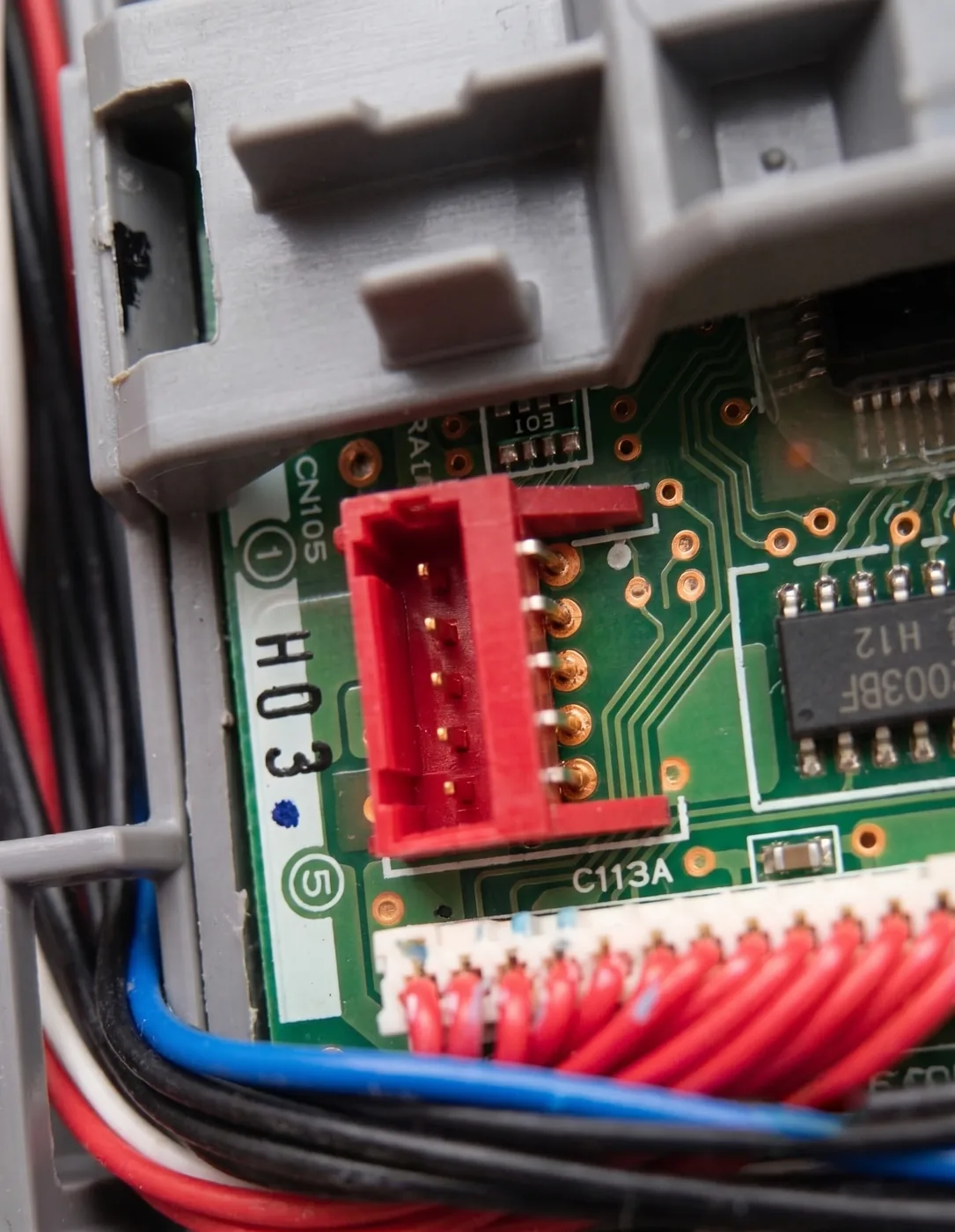
Pop the front panel off the indoor unit and find the main control board, usually over on the right. CN105 is a small 5-pin connector, often red, sometimes white, with "CN105" printed on the board right beside it. See that label and you're done. The wiring reference shows exactly what it looks like so you know what you're hunting for.
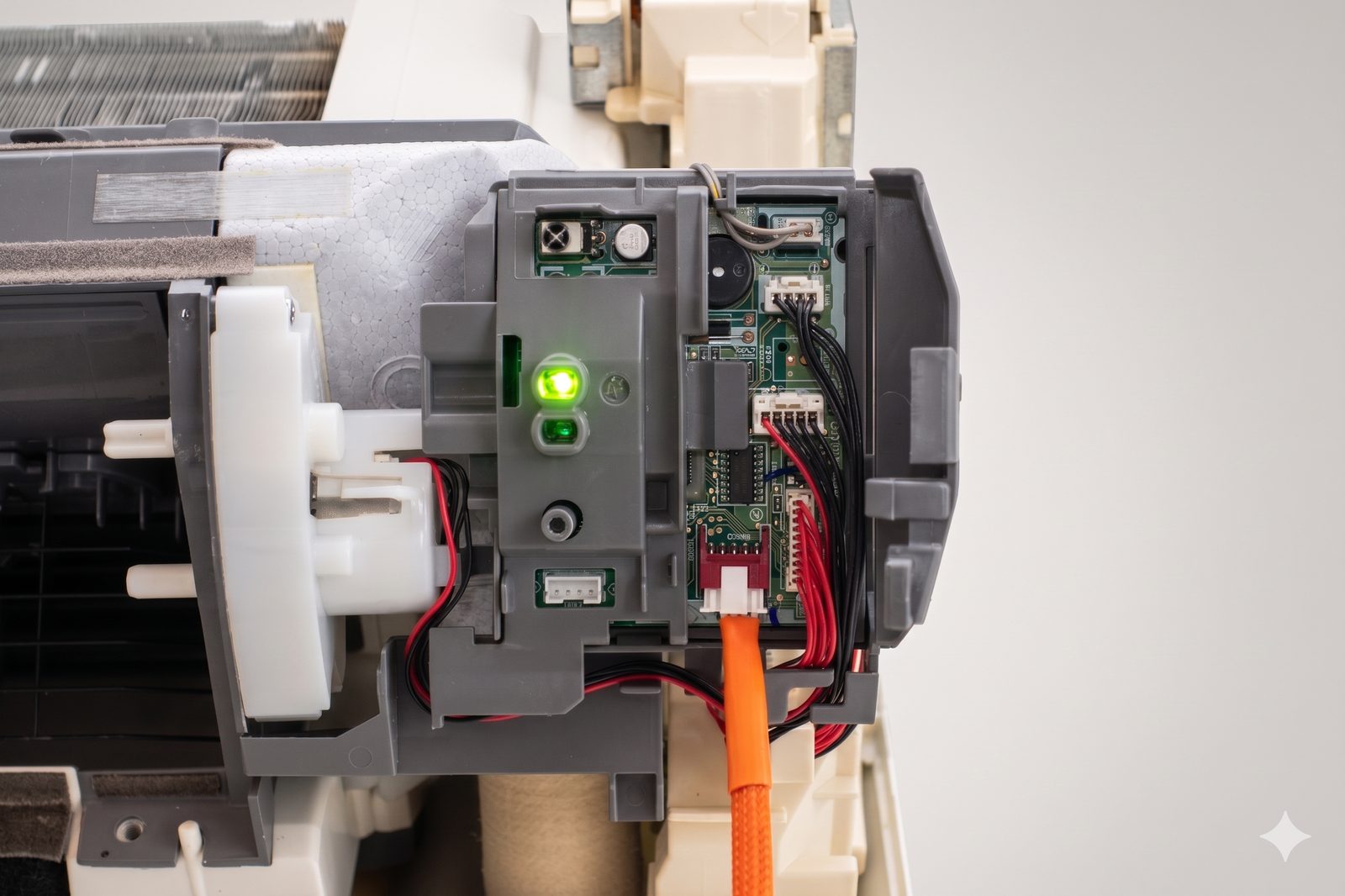
That's the control board of an MSZ-GL06NA, with the Serin cable already seated in CN105, the red connector low on the board. Before your hardware arrives, you're just confirming that empty connector is present and labeled.
What Doesn't Have CN105
A few units will trip you up. Go in knowing them.
Mitsubishi Heavy Industries is not Mitsubishi Electric. Different company, full stop. Models starting with SRK, SRC, or SRF are Heavy Industries. They use a different control protocol and have no CN105 connector. This is the mix-up I see more than any other, so check the brand carefully, not just the word "Mitsubishi."
Air-to-water heat pumps are a trap. Ecodan, Zubadan, and Geodan units have a CN105 connector physically, but they speak a different serial dialect. The connector is there; this controller can't talk to it. Run an air-to-water system? This isn't your project.
Very old and a few oddball units. Units from roughly pre-2006 may not have the port at all. And a handful of models, the MSZ-HJ series and some China-market units among them, have the CN105 solder pads on the board but no connector fitted. People have soldered one on. Most shouldn't have to. If that's your unit, the compatibility page flags it.
Multi-Zone? One Port Per Head
Running several indoor heads off a single outdoor unit? Each indoor head has its own CN105 port, and each needs its own controller. The outdoor unit doesn't get one. So a three-head house means three boards, three cables, three ports, each confirmed the same way. Nothing changes about the check. You just do it three times.
Still Not Sure? Ask the Community List
If your model isn't obvious from the prefix and you can't get eyes on the board yet, the SwiCago/HeatPump project keeps the most thorough community-verified list out there, with hundreds of confirmed units from people worldwide. Anything on that list works here, because it's the same CN105 serial protocol underneath.
Browse the community compatibility list, or check your model against the Serin compatibility page, which folds in those reports along with manufacturer data.
Once You've Confirmed It
Found your port? The hard part is over. Here's the rest of the path:
- Get the board and cable, one set per indoor unit.
- Flash the firmware from your browser. Two options, ESPHome for Home Assistant or the Apple Home compatible build for Apple households, and the ESPHome vs Apple Home comparison walks you through picking one.
- Doing all this specifically to escape the factory app? The Kumo Cloud alternative writeup covers the why and what you actually gain.
That's the whole sequence, and it all hangs on that one connector. The overwhelming majority of Mitsubishi Electric indoor units have it, so odds are strongly in your favor. Confirm CN105, and local control is yours.
Related
Next step
Check your unit first
Type your indoor unit's model number for a verdict in under a minute. If it fits, the firmware flashes in the browser in about two minutes.